
How to Add Your Business to Amazon Alexa?
You can’t add your business to Amazon Alexa directly, because no such registration portal exists. Alexa is a voice assistant that pulls business information from directories it already trusts — mainly Google Business Profile, Yelp, Bing Places, and Apple Maps — so getting “found on Alexa” means making sure your listings on those platforms are accurate, complete, and consistent, not filling out a form on Amazon’s site.
Clearing Up a Common Point of Confusion
If you’ve seen advice claiming you can visit an “Alexa directory,” submit your site, and verify ownership through DNS records with a one-to-two-week approval wait, that advice is describing something else entirely — likely a holdover reference to the old Alexa.com website-ranking service, a completely separate (and now discontinued) product that had nothing to do with Amazon’s Alexa voice assistant. There’s no equivalent submission process for the Alexa voice assistant used in Echo devices and smart speakers. If a guide tells you to “add your site to Alexa” through a direct portal, treat that as outdated or mistaken information.
Automate & Scale Your Small Business
Replace 10+ costly subscriptions with 1 all-in-one CRM, Funnels & Marketing Engine.
What actually works is optimizing the sources Alexa checks when someone asks their Echo device to find a business like yours.
Where Alexa Actually Gets Its Business Data
Alexa doesn’t maintain its own database of local businesses. When a user asks a voice query with local intent, Alexa checks a set of directories and data platforms it already indexes:
- Google Business Profile — feeds Google’s own ecosystem and, indirectly, other search infrastructure Alexa references. Relevant to nearly every business type.
- Yelp — a primary source for restaurant, retail, and many service-business data, including reviews and photos.
- Bing Places — supplies web search results and local listing data through Microsoft’s search infrastructure.
- Apple Maps — relevant to device-level and iOS-adjacent queries; often pulls its own reviews and photos from Yelp.
- Your own website, if it includes structured data (schema markup) — gives Alexa a direct, machine-readable source instead of relying entirely on third parties.
If you run a restaurant or retail shop, prioritize Yelp first. If you run a professional service business — plumbing, HVAC, legal, medical — Google Business Profile and Bing Places typically carry more weight, since fewer customers are Yelp-first for those categories.
Launch Your Business On Fast VPS Hosting
Secure, high-performance hosting designed for growth. Don't lose sales to slow site speed.
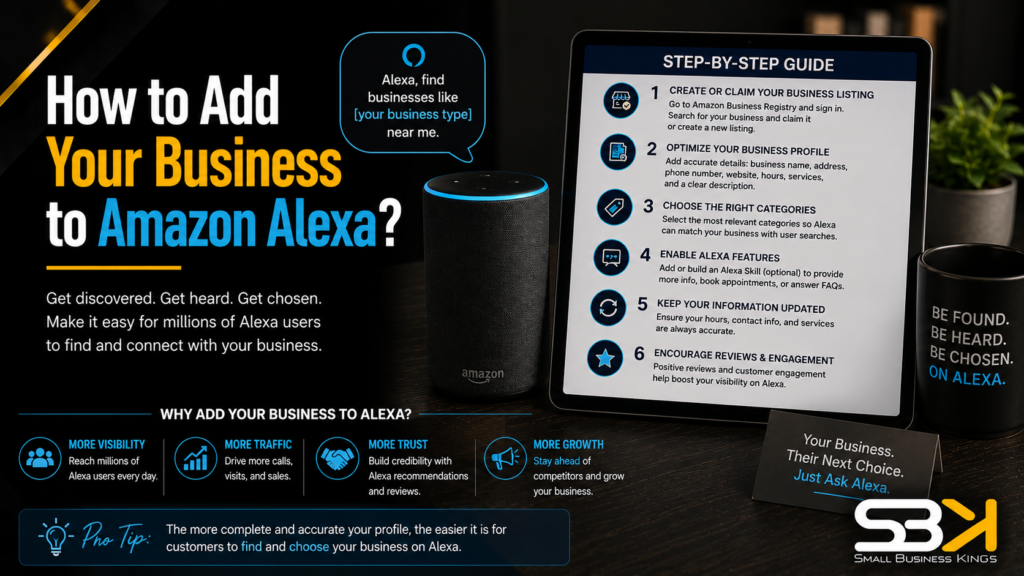
Step-by-Step: Getting Your Business Alexa-Ready
- Claim and fully complete your Google Business Profile. Fill in every field: category, hours, phone number, address, services, photos, and website URL. An incomplete profile is consistently deprioritized in favor of a fuller one, so half-finished information works against you rather than being neutral.
- Create listings on Yelp, Bing Places, and Apple Maps. Skipping any one of these leaves a gap in the data layer Alexa cross-references — even if your Google listing is perfect, missing Yelp coverage can hurt you specifically for restaurant- and retail-type discovery queries.
- Check your NAP (Name, Address, Phone) for consistency across every platform. This is the step most guides mention but don’t explain how to actually do — see the walkthrough below.
- Add LocalBusiness schema markup to your website. This gives Alexa a structured, direct source for your hours, services, and contact details rather than relying entirely on third-party directories staying accurate.
- Actively collect and respond to reviews on Google and Yelp. Review volume and recency both function as trust signals; a business with steady, recent reviews tends to outperform one with a large but stale review history.
- Recheck all your listings every few months. Hours change, phone numbers get reassigned, addresses move. A periodic audit catches drift before it costs you a customer who gets sent to the wrong number or an outdated address.
How to Actually Check Your NAP Consistency
Most advice tells you NAP consistency matters without explaining how to verify it. Here’s the practical version:
- Open your Google Business Profile, Yelp listing, Bing Places listing, and Apple Maps listing in separate tabs.
- Write down your business name, full street address, and phone number exactly as they appear on each — down to abbreviations and punctuation.
- Compare all four side by side, looking specifically for mismatches like “St.” versus “Street,” “Suite” versus “Ste” versus “#,” different phone number formatting (dashes versus parentheses), or an outdated address from a past move.
- Pick one exact format and update every platform — including your own website’s footer and contact page — to match it precisely.
- Search your business name plus your city on Google to catch any old or duplicate listings you may have forgotten about, and either update, claim, or request removal of anything outdated.
This is tedious, but it’s a genuinely fixable afternoon project for a single-location business, and it quietly undermines every other optimization step if left unaddressed.
Free Business Blueprint
Steal the roadmap smart entrepreneurs use to launch, grow, and scale their businesses while avoiding expensive mistakes.
Adding Schema Markup Without Hiring a Developer
Schema sounds technical, but most business owners have three realistic paths to actually implementing it:
- Website builder plugins. If your site runs on WordPress, Squarespace, or Wix, schema plugins or built-in settings can generate LocalBusiness markup automatically from your existing site information — no code required.
- Free schema generator tools. Fill in a form with your business name, address, hours, and services, and the tool outputs code you paste into your site’s header or footer template.
- Your web developer or design partner. If your site is custom-built, this is typically a quick, low-cost task for whoever maintains it.
If you’re not confident the markup is correct, run it through a schema validation tool before considering the job done — incorrectly implemented schema (missing required fields, deprecated formats) provides no benefit and can occasionally cause parsing issues.
Do You Need a Custom Alexa Skill?
Some guides mention building an “Alexa Skill” — a custom voice app — in the same breath as basic local visibility. These are not the same undertaking, and conflating them causes unnecessary confusion.
A Skill is a purpose-built voice application, similar to a mobile app, that lets users interact with your business conversationally — checking order status, booking an appointment by voice, or asking product questions. Building one requires development work through Amazon’s Alexa Skills Kit and typically involves cloud infrastructure like AWS Lambda to handle the logic behind it.
For the vast majority of local businesses — restaurants, contractors, retail shops, service providers — a Skill isn’t necessary to simply “show up” when someone asks Alexa to find or call your business. That basic discoverability comes entirely from the directory optimization above. A Skill is worth considering only if you want a deeper, ongoing voice interaction with customers beyond being found — and it’s a genuinely separate project with its own development timeline and cost, not a next step in basic Alexa visibility.
What Kind of Voice Search Is Someone Using to Find You?
Not all voice queries work the same way, and knowing which type applies to your business changes what to prioritize:
| Search Type | Example Query | What the User Wants | What Matters Most |
|---|---|---|---|
| Discovery | “Best plumber near me” | Comparing options | Review rating, review count, category match |
| Direct | “Call Joe’s Plumbing” | Reaching a specific business | Exact name and phone match (NAP accuracy) |
| Knowledge | “How much does a plumber cost?” | General information | Schema markup, FAQ content on your site |
Discovery searches are the highest-volume category for most local businesses, and they’re won primarily on review signals. If you only have time to fix one thing this month, a genuine push to collect fresh reviews usually moves the needle furthest for discovery-type queries. Direct searches hinge almost entirely on NAP accuracy — if a customer says “call [your business name]” and your listed number doesn’t match exactly, the match can fail even if everything else about your listing is strong.
How Long Does This Actually Take?
There’s no published timeline from Amazon for how quickly directory updates propagate into Alexa’s results, and it varies by platform and how quickly each one processes changes. In practice, expect anywhere from several days to a few weeks after you update a listing before you’d notice a difference in voice search behavior — this isn’t instant, so don’t judge your work by checking the next day. If you’ve completed every step above and still aren’t appearing after a reasonable window, the most common culprits are a still-inconsistent NAP somewhere, a missing directory (often Yelp, for restaurant and retail categories specifically), or a thin, stale review profile.
Getting Found Once Customers Reach Your Website
Directory optimization gets a customer to discover you — but what happens once they land on your site matters just as much, especially since many voice searches lead directly to a mobile site visit right after Alexa responds. A slow-loading or poorly organized website causes drop-off even when Alexa surfaces your business correctly, so your site needs to load fast, look professional, and make it obvious how to contact or book you. If you’re building or rebuilding your online presence to support this kind of visibility, SBK works with Softangles for exactly this: they handle business website design and hosting, logo and brand/media design, and CRM/sales pipeline setup, so the traffic your directory optimization generates actually converts into booked customers instead of bouncing off a slow or confusing site.
Frequently Asked Questions
Can I register my business directly with Amazon Alexa?
No — there is no direct registration portal for Amazon Alexa business visibility. Some outdated guides describe a submission process that actually refers to the old, unrelated Alexa.com website-ranking service, not the Amazon Alexa voice assistant used in Echo devices.
How is an Alexa Skill different from just getting found on Alexa?
Getting found on Alexa means your business shows up when someone asks a local voice query, and it’s driven entirely by directory listings and website schema. An Alexa Skill is a custom voice application you’d build separately using Amazon’s developer tools, meant for deeper, ongoing voice interactions rather than basic discoverability.
Do I need to pay for a listing management service to show up on Alexa?
Not necessarily. A single-location business with stable hours and contact information can typically manage the core directories — Google Business Profile, Yelp, Bing Places, Apple Maps — manually in a few hours. Paid distribution tools mainly earn their cost for multi-location businesses or those whose information changes frequently.
Why isn’t my business showing up on Alexa even though I have a Google Business Profile?
The most common causes are an inconsistent NAP somewhere across your listings, a missing directory (Yelp especially matters for restaurants and retail), or a thin or stale review profile. Work through each of these in order, since NAP mismatches and missing listings are usually the fastest and most common fixes.
Does schema markup actually make a measurable difference?
It gives Alexa a direct, structured source for your business details, which is especially useful for knowledge-type voice queries like “how much does X cost.” It won’t compensate for inconsistent NAP or a weak review profile on its own — treat it as one part of a complete setup rather than a fix by itself.
Launch Your Business On Fast VPS Hosting
Secure, high-performance hosting designed for growth. Don't lose sales to slow site speed.
Will optimizing for Alexa also help me show up on Siri and Google Assistant?
Largely yes, since Siri draws heavily on Yelp and Apple Maps, and Google Assistant draws directly on Google Business Profile. Getting your NAP consistent and your reviews strong across these same platforms improves your visibility across all three voice assistants, not just Alexa.